
If you’ve ever worked on a Business Central extension that needs to support multiple “flavors” of the same operation—different shipping providers, different document formats, different pricing strategies—you’ve probably felt the pain of tightly coupled code. Interfaces in AL solve that problem by letting you define a contract (a set of methods) and then swap implementations without touching the calling code.
Interfaces were introduced in Business Central 2020 release wave 1 and have quickly become an important pattern for building extensible, maintainable AL solutions. If you haven’t used them yet, this article walks through what they are, why they matter, and how to build with them.
You can find the full code for the example on GitHub.
What Is an Interface?
An interface is a named object that declares one or more procedure signatures—but contains no implementation. It defines what a Codeunit must do, not how it does it.
interface IDocumentValidator
{
    procedure Validate(var RecRef: RecordRef): Boolean;
}
Any Codeunit that claims to implement IDocumentValidator must provide a concrete body for Validate. The AL compiler enforces this at build time—if a method is missing, you get an error.
Key characteristics:
- An interface contains only procedure declarations (no variables, no triggers, no logic).
- It cannot be instantiated or called directly.
- It acts as a contract between the code that calls a behavior and the code that provides it.
Why You Should Care
- Loose coupling: Your calling code depends on the interface, not on a specific Codeunit. You can swap implementations without modifying callers.
- Extensibility without events: Partners and ISVs can add new behavior by implementing the interface and extending the enum—no event subscriptions needed.
- Polymorphism: You can declare a variable as an interface type and call methods on it. At runtime, the actual implementation executes based on which Codeunit was selected.
- Testability: You can create a “mock” Codeunit that implements the interface for testing purposes.
How It Works: The Three-Part Pattern
Interfaces in AL rely on three cooperating objects:
- The interface – declares the method signatures.
- One or more Codeunits – each implements the interface with concrete logic.
- An enum – ties enum values to specific implementations.
This trio is the standard pattern. The enum is the dispatch mechanism. When you assign an enum value, Business Central knows which Codeunit to run.
Example: A Discount Calculator
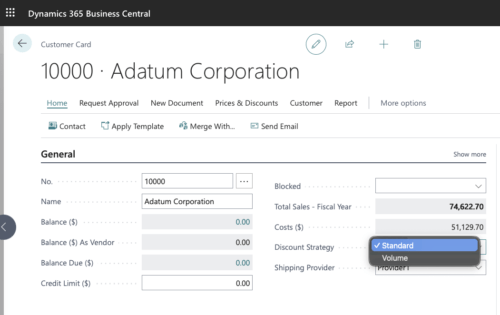
Let’s say you want to support multiple discount strategies. Start with the interface:
interface IDiscountCalculator
{
    procedure CalculateDiscount(var SalesLine: Record "Sales Line"): Decimal;
}
Then create two implementations:
Codeunit 50100 "DVLPR Standard Discount" implements IDiscountCalculator
{
    procedure CalculateDiscount(var SalesLine: Record "Sales Line"): Decimal
    begin
        exit(SalesLine."Line Amount" * 0.05); // flat 5%
    end;
}

Codeunit 50101 "DVLPR Volume Discount" implements IDiscountCalculator
{
    procedure CalculateDiscount(var SalesLine: Record "Sales Line"): Decimal
    begin
        if SalesLine.Quantity >= 100 then
            exit(SalesLine."Line Amount" * 0.15)
        else
            exit(SalesLine."Line Amount" * 0.05);
    end;
}
Wire them up through an enum:
enum 50160 "DVLPR Discount Strategy" implements IDiscountCalculator
{
    Extensible = true;

    value(0; Standard)
    {
        Implementation = IDiscountCalculator = "DVLPR Standard Discount";
    }
    value(1; Volume)
    {
        Implementation = IDiscountCalculator = "DVLPR Volume Discount";
    }
}
Now your calling code never needs to know which strategy is active:
procedure ApplyDiscount(Strategy: Enum "DVLPR Discount Strategy"; var SalesLine: Record "Sales Line")
var
    Calculator: Interface IDiscountCalculator;
begin
    Calculator := Strategy;
    SalesLine."Line Discount Amount" := Calculator.CalculateDiscount(SalesLine);
end;
If a partner wants to add a “Loyalty” discount strategy later, they just create a new Codeunit that implements IDiscountCalculator, add an enumextension value, and they’re done. No modifications to your calling code.
Using Existing Interfaces in Business Central
Microsoft already ships several interfaces in the base application and system application. A practical way to get comfortable with interfaces is to implement one that already exists.
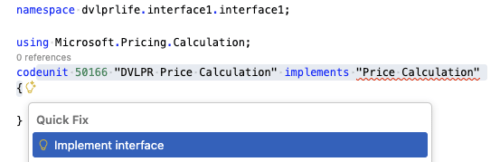
For example, the E-Document module defines an E-Document interface. To use it:
- Find the interface: Use the AL Explorer in VS Code to browse available interfaces.
- Create a Codeunit that
implementsthe interface. - Use the “Implement Interface” quick action in VS Code—hover over the interface name and let the tooling generate empty stubs for all required methods.
- Extend the corresponding enum with your new value and implementation mapping.
This is a great way to learn the pattern because the plumbing is already in place—you just supply the logic.
Snippet Support
VS Code has a built-in snippet for interfaces. Type tinterface in an AL file and the AL Language extension generates the basic structure for you. This is a quick way to scaffold a new interface and avoid syntax mistakes.
Implementing Multiple Interfaces
A single Codeunit can implement more than one interface:
Codeunit 50164 "DVLPR Multi Provider" implements IDiscountCalculator, IShippingProvider
{
    procedure CalculateDiscount(var SalesLine: Record "Sales Line"): Decimal
    begin
        // discount logic
    end;

    procedure GetShippingRate(Length: Decimal; Width: Decimal; Height: Decimal; Weight: Decimal): Decimal
    begin
        // shipping logic
    end;
}
Be careful with method name collisions. If two interfaces define a method with the same name and signature, the compiler expects a single implementation to satisfy both. If the signatures differ, you’ll get a compile error. The analyzer rules AL0587 and AL0675 help catch these situations.
Type Testing and Casting
Business Central supports type testing and casting operators for interface variables, which allows you to check at runtime whether an interface variable holds a specific implementation:
var
    Calculator: Interface IDiscountCalculator;
begin
    if Calculator is "DVLPR Volume Discount" then
        Message('Volume discount is active');
end;
This is useful when you need conditional logic based on the underlying implementation, though use it sparingly—heavy use of is checks can undermine the polymorphism that interfaces are meant to provide.
Lists and Dictionaries of Interfaces
Starting with Business Central 2025 release wave 1 (runtime 15.0), you can create List and Dictionary collections of interface types:
var
    MyCircle: Codeunit Circle;
    MySquare: Codeunit Square;
    Shape: Interface IShape;
    Shapes: List of [Interface IShape];
begin
    Shapes.Add(MyCircle);
    Shapes.Add(MySquare);

    foreach Shape in Shapes do
        Message('Area: %1', Shape.GetArea());
end;
This opens up patterns like maintaining a registry of handlers or processing a collection of implementations in sequence.
Extending Interfaces
Starting with Business Central 2024 release wave 2, interfaces support the extends keyword. This lets you create a new interface that inherits all methods from one or more existing interfaces and adds its own on top. It’s particularly useful for ISVs and partners who want to build on each other’s interfaces without modifying the originals.
The syntax looks like this:
interface IExtendedInterface extends IBaseInterface
{
    procedure AdditionalMethod();
}
Any Codeunit that implements the extended interface must provide concrete implementations for all methods—both those defined in the base interface(s) and any new methods declared in the extension.
A good real-world example is the "Price Calculation" interface in the base application. This interface is the backbone of the extensible pricing system in Business Central. It declares methods like Init, ApplyDiscount, ApplyPrice, GetLine, and others that a pricing handler must implement. The "Price Calculation Handler" enum maps each value to a Codeunit that implements the interface, which is how Business Central decides which pricing engine runs at runtime.
If you needed to extend this pattern—say you wanted a pricing handler that also supports contract-specific pricing—you could define a new interface that extends the original:
interface IContractPriceCalculation extends "Price Calculation"
{
    procedure SetContractNo(ContractNo: Code[20]);
    procedure GetContractDiscount(): Decimal;
}
A Codeunit implementing IContractPriceCalculation would need to provide all the methods from "Price Calculation" plus the two new ones. This means existing code that works with "Price Calculation" continues to work unchanged, while new code can take advantage of the extended contract.
You can also extend multiple interfaces at once:
interface ICombined extends IFirst, ISecond
{
    procedure CombinedMethod();
}

Codeunit 50160 DVLPRCombines implements ICombined
{
    // Must implement IFirst, ISecond, ICombined
}
Gotchas and Recommended Approach
- Don’t add methods to published interfaces. Once your interface is in production, adding a method breaks every existing implementation. The AppSourceCop rule
AS0066catches this. Use interface extensions (BC 2024 wave 2+) or versioning instead. - Keep interfaces small and focused. A few related methods per interface is better than one giant interface that tries to cover everything.
- Use meaningful names. Prefix with
I(likeIAddressProvider) to make interface types immediately recognizable. - Be aware of circular references. Interfaces, enums, and implementing Codeunits can create circular dependency chains. Rule
AL0852flags this. - Avoid naming conflicts with built-in procedures. Rule
AL0616catches this, but it’s easy to trip over. - Document expected behavior. The interface definition alone tells the compiler what methods exist, but not how they should behave. Use XML documentation comments or a companion doc to describe expectations (pre/post conditions, expected error handling, etc.).
- Set
Extensible = trueon enums when you want partners to add implementations via enum extensions.
Wrapping Up
Interfaces are a powerful pattern available in AL today. They let you design systems where behavior can be extended and swapped without modifying existing code—a core requirement for any healthy extension ecosystem.
The pattern is straightforward: define an interface, implement it in Codeunits, wire it through an enum, and call it polymorphically. Once you see it in action, you’ll find yourself reaching for it any time you need pluggable behavior.
Learn more:
- Interfaces in AL (Microsoft Learn)
- Implement interfaces in Dynamics 365 Business Central (Training module)
You can find the full code for the example on GitHub.
Note: The code and information discussed in this article are for informational and demonstration purposes only. This content was written referencing Microsoft Dynamics 365 Business Central 2025 Wave 2 online. Interfaces are available from Business Central 2020 release wave 1 and later. Always test in a sandbox first.