
What Is A Page Background Task In Business Central?
A Page Background task is a technique for enhancing performance in Business Central. This method allows us to execute lengthy or resource-intensive reading processes asynchronously in the background without disrupting the user interface. Page Background tasks speed up page load times; as a result, users can continue their work while operations are carried out in the background. This approach helps create faster and more responsive pages in Business Central, leading to a better user experience. Typical places where you might use background tasks are on cues and pages in FactBoxes or statistical pages that show many totals.
If you want to jump to the code sample on GitHub go here.
How Page Background Tasks Work
When a page is opened in the client, a session is established between the Page and the Business Central Server instance. This session can be considered the parent session. As users interact with the Page, they may encounter lengthy calculations that prevent them from continuing until the calculations are completed. A Page Background task operates as a child session that executes processes from a codeunit in the background. While this task is running, the user can continue working on the Page. The key difference is that when the background process finishes, the child session ends, and the parent session is notified of the task’s results. Subsequently, the client will handle these results on the Business Central Server instance.
Characteristics of a Background Task
- It can only perform read-only operations and cannot write to or lock the database.
- It operates on the same Business Central Server instance as the parent session.
- The parameters passed to and returned from the Page Background task are in the form of a Dictionary of [Text, Text].
- The callback triggers are limited to executing UI operations related to notifications and control updates.
- If the calling page or session is closed or if the current record is changed, the background task will be canceled.
- There is a default and maximum timeout for Page Background tasks, which will also result in automatic cancellation.
- The background task runs independently from the parent session. Aside from completion and error triggers, it cannot communicate back to the parent session.
- Page Background tasks do not count towards the license calculation.
- You can have multiple background sessions running for a parent session.
Creating a Page Background task
You create a codeunit, the child, to run the computations you want in the background. You’ll also have to include code that collects the results of computations and passes them back to the calling page for handling.
The background task Codeunit is a standard Codeunit with the following characteristics:
- The OnRun() trigger is invoked without a record.It can’t display any UI.
- It can only read from the database, not write to the database.
- Casting must be manually written in code by using Format() and Evaluate() methods.
In the Codeunit, you call the Page.GetBackgroundParameters procedure to read the parameter dictionary that was passed when enqueuing the task. The Page.SetBackgroundTaskResult procedure is used to set the page background task result as a dictionary.
procedure GetBackgroundParameters(): Dictionary of [Text, Text]
procedure SetBackgroundTaskResult(Results: Dictionary of [Text, Text])
You create a page, the parent, that tells Business Central to start a child session. The parent signals the start of the background task with the CurrPage.EnqueueBackgroundTask. The codeunit to run and its parameters are passed to the x. BusinessCentral will assign a TaskID to the var parameter, which can be used for tracking purposes.
local procedure EnqueueBackgroundTask(var TaskId: Integer, CodeunitId: Integer, var [Parameters: Dictionary of [Text, Text]], [Timeout: Integer], [ErrorLevel: PageBackgroundTaskErrorLevel]): Boolean
When the child session completes, it uses the OnPageBackgroundTaskCompleted trigger to signal the parent page that it is done. Any information that the child Codeunit needs to pass back to the parent is passed in a ‘Result‘ Dictionary of [Text.Text].
local trigger OnPageBackgroundTaskCompleted(TaskId: Integer, Results: Dictionary of [Text, Text])
Example Page Background Task
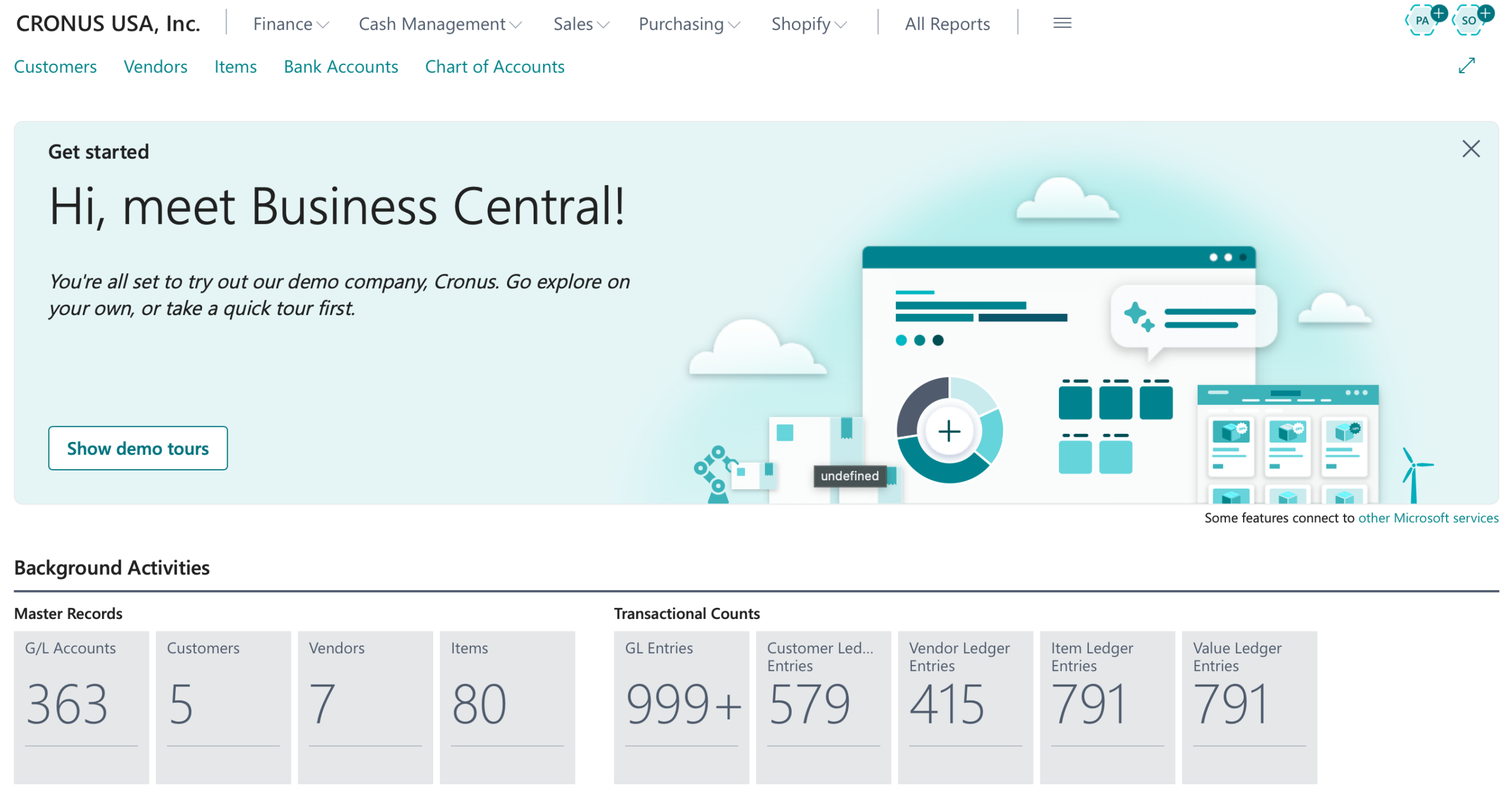
In a Business Central environment, companies often have millions of records across core tables, for example:
- Master data: Customer, Vendor, Item, G/L Account
- Transactional data: G/L Entry, Item Ledger Entry, Value Entry, Customer Ledger Entry, Vendor Ledger Entry
Suppose you need to create a simple Role Center page that shows the total count of records in each of these tables. Most developers will add code to the OnAfterGetRecord or OnOpenPage trigger using the TableName.COUNT() procedure, which will execute all counts sequentially on the client session. On a large database this can easily take 10–30 seconds or more, during which the page appears frozen — a classic user-experience complaint.
- Create a Page Background Task Codeunit to count the records in the table specified in a background parameter.
    trigger OnRun()
    var
        RecordRef: RecordRef;
        Result: Dictionary of [Text, Text];
        TableNo: Integer;
    begin
        if not Evaluate(TableNo, Page.GetBackgroundParameters().Get('TableNo')) then
            Error('TableNo parameter is missing or invalid');

        RecordRef.Open(TableNo);
        Result.Add('Count', Format(RecordRef.Count, 0, 9));
        Result.Add('TableNo', Format(TableNo));
        RecordRef.Close();

        Page.SetBackgroundTaskResult(Result);
    end;
- Perform the calculation, then set the result.
- Create a page that displays record count information for Cues, which can be added to a RoleCenter.
page 50121 "DVLPR Cue Activities"
{
    Caption = 'Background Activities';
    PageType = CardPart;
    RefreshOnActivate = true;
    ShowFilter = false;

    layout
    {
        area(content)
        {
            cuegroup(MasterRecords)
            {
                Caption = 'Master Records';
                field(CountCustomers; this.CustomerCount)
                {
                    ApplicationArea = Basic, Suite;
                    Caption = 'Customers';
                    ToolTip = 'Specifies the total number of customer records.';
                    BlankZero = true;
                }
            }
            cuegroup(Transactions)
            {
                Caption = 'Transactional Counts';
                field(CountCustomerLedgerEntries; this.CustomerLedgerEntryCount)
                {
                    ApplicationArea = Basic, Suite;
                    Caption = 'Customer Ledger Entries';
                    ToolTip = 'Specifies the total number of customer ledger entries.';
                    BlankZero = true;
                }
            }
        }
    }

    trigger OnAfterGetCurrRecord()
    begin
        this.CountLedgerEntries();
    end;

    var
        CustomerCount: Integer;
        CustomerLedgerEntryCount: Integer;

    local procedure CountLedgerEntries()
    var
        Parameters1,
        Parameters2 : Dictionary of [Text, Text];
        TaskId: Integer;
    begin
        Parameters1.Add('TableNo', Format(Database::Customer));
        CurrPage.EnqueueBackgroundTask(TaskId, Codeunit::"DVLPR Background Cues", Parameters1);

        Parameters2.Add('TableNo', Format(Database::"Cust. Ledger Entry"));
        CurrPage.EnqueueBackgroundTask(TaskId, Codeunit::"DVLPR Background Cues", Parameters2);

    end;

    trigger OnPageBackgroundTaskCompleted(TaskId: Integer; Results: Dictionary of [Text, Text])
    var
        TableNo: Integer;
    begin
        if not Evaluate(TableNo, Results.Get('TableNo')) then
            Error('TableNo result is missing or invalid');

        case TableNo of
            Database::Customer:
                if Results.ContainsKey('Count') then
                    Evaluate(this.CustomerCount, Results.Get('Count'));
            Database::"Cust. Ledger Entry":
                if Results.ContainsKey('Count') then
                    Evaluate(this.CustomerLedgerEntryCount, Results.Get('Count'));
        end;
    end;

    trigger OnPageBackgroundTaskError(TaskId: Integer; ErrorCode: Text; ErrorText: Text; ErrorCallStack: Text; var IsHandled: Boolean)
    begin
        // Handle errors here
    end;
- On the Page, EnqueueBackground tasks to spawn children that will count the records in each table.
- Specify code in the OnPageBackgroundTaskCompleted trigger to update the values as each child task returns them.
- Specify error handling for the child tasks in the OnPageBackgroundTaskError trigger.
Note: The code and information discussed in this article are for informational and demonstration purposes only. This content was created referencing Microsoft Dynamics 365 Business Central 2025 Wave 2 online.
A full listing of the sample code may be found on GitHub here.