Events Subscriptions in Business Central
In Business Central, event subscriptions allow extensions to hook into core application logic, enabling customization without modifying base code. The publisher declares an event at an occurrence in the application. An event publisher method has a signature only and doesn’t execute any code. The publisher exposes an event to subscribers, providing them with a hook into the application. A subscriber listens for and processes a published event. When an event is triggered, the subscriber method is executed, and its code runs.

However, there are scenarios where you need more granular control over when and how these subscriptions are active—such as in background sessions, conditional logic, or performance-optimized codeunits. I have seen many instances and creative ways in which developers have tried to determine when their even subscription code is executed selectively.
Binding Subscriptions
The need to selectively execute subscriber event code is where the Session.BindSubscription and Session.UnbindSubscription procedures come into play, offering dynamic binding of event subscribers at runtime. These methods let you attach or detach codeunit instances containing event subscribers to the current session programmatically. Binding subscriptions is particularly useful when they should apply only in specific contexts. In this post, we’ll explore binding subscriptions, including the important EventSubscriberInstance property on Codeunits.
For a complete code sample, check out this sample on GitHub.
The EventSubscriberInstance Property
The EventSubscriberInstance property on a Codeunit specifies how event subscriber functions in a Codeunit are bound to the Codeunit instance and the events that they subscribe to. There are two options:
StaticAutomatic: Subscribers are automatically bound to the events that they subscribe to.
Manual: Subscribers are bound to an event only if the BindSubscription method is called from the code that raises the event.
The default property value is StaticAutomatic. When the property value is set to StaticAutomatic, the code in the event subscribers in the Codeunit will always execute. When the property is set to Manual, the code will only execute when the Session is bound to the codeunit.
What Are Session.BindSubscription and Session.UnbindSubscription?
Session.BindSubscription and Session.UnbindSubscription are methods on the Session data type that allow runtime management of event subscribers. At their core:
BindSubscription: Attaches a Codeunit instance containing event subscribers to the current session, making the subscribed events active immediately.
UnbindSubscription: Detaches the Codeunit instance, pausing event handling until rebound.
Dynamic binding gives you control over the lifecycle by limiting active subscribers. The EventSubscriberInstance property is central here—it’s a property set on the subscriber codeunit itself. When set to Manual, it allows the codeunit to be bound and unbound dynamically. This property must be set to Manual for BindSubscription and UnbindSubscription to work; otherwise, an error occurs.

How Session Subscription Binding Works
Under the hood, Business Central sessions maintain a registry of active event subscribers. When you call BindSubscription, the system registers the codeunit instance in the current session’s event queue, allowing it to receive and process published events. UnbindSubscription removes it from the queue, effectively pausing it. Bindings are automatically removed when the codeunit instance goes out of scope (e.g., end of a procedure), but explicit unbinding allows for earlier cleanup. Key mechanics:
-
- Binding happens synchronously in the current session.
- Events published after binding will trigger the subscriber’s method.
- Unbinding is also immediate, but any in-flight events may still process.
- The EventSubscriberInstance property set to Manual ensures the subscribers are not automatically bound.
- Bindings are session-specific and static from the publisher’s perspective: once bound, all publisher instances trigger the subscribers.
This approach integrates seamlessly with Business Central’s event model, supporting publishers from base app Codeunits to custom extensions.
Creating and Using Dynamic Subscriptions
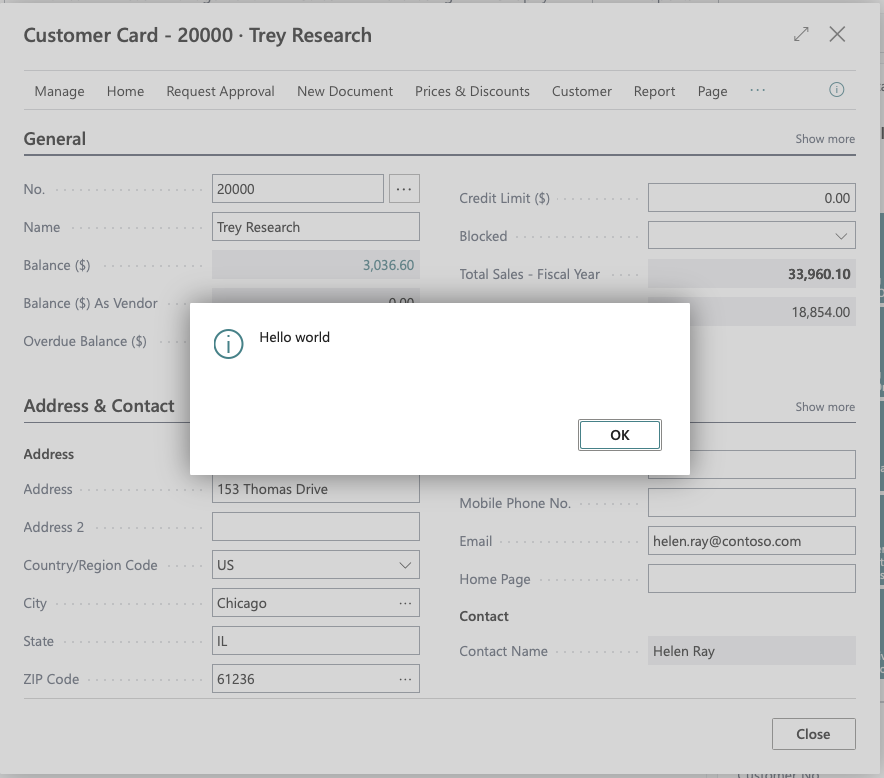
In this sample, two new actions will be added to the customer list that display the Customer Card for the selected record. One action will have a bound event that displays ‘Hello World,’ and the other will display the card without the event.
To get started, you’ll need to:
- Create a Codeunit and set the EventSubscriberInstance property to Manual.
- In the Codeunit, create the Event Subscriber method.
- In the code where you’d like to enable the events in the Codeunit, create a variable for the Codeunit.
- In the place where you’d like the events to become active, call the Session.BindSubscription method, with the Codeunit variable as the parameter.
- Trigger events to test.
- When done, call the SessionUnbindSubscription method, passing the Codeunit variable as the parameter to explicitly remove the event binding.
codeunit 50130 "DVLPR Subscription Management"
{
    EventSubscriberInstance = Manual;

    [EventSubscriber(ObjectType::Page, Page::"Customer Card", 'OnOpenPageEvent', '', false, false)]
    local procedure OnOpenPageCustomerCard()
    begin
        Message('Hello world');
    end;
}
codeunit 50131 "DVLPR BindSubscription Example"
{
    procedure OpenCustomerCard(Rec: Record "Customer")
    var
        CustomerCardPage: Page "Customer Card";
    begin
        CustomerCardPage.SetRecord(Rec);
        CustomerCardPage.RunModal();
    end;

    procedure OpenCustomerCardBinding(Rec: Record "Customer")
    var
        SubscriptionManagement: Codeunit "DVLPR Subscription Management";
        CustomerCardPage: Page "Customer Card";
    begin
        Session.BindSubscription(SubscriptionManagement);
        CustomerCardPage.SetRecord(Rec);
        CustomerCardPage.RunModal();
        Session.UnbindSubscription(SubscriptionManagement);
    end;
}
Wrapping Up
Dynamic subscription binding with Session.BindSubscription, Session.UnbindSubscription and setting the EventSubscriberInstance property to Manual unlocks finer control over AL event handling, making your extensions more efficient and adaptable. Whether optimizing background jobs or implementing conditional customizations, these tools are essential for modern Business Central development.
For the full sample, visit GitHub.