
NetAlertX is an open-source, self-hosted network monitoring application that scans local Wi-Fi or LAN networks to identify connected devices. It provides real-time alerts for events such as new device connections, disconnections, and critical changes. Users often utilize NetAlertX to detect intruders or unauthorized devices on their networks.
The application stores device metadata locally, ensuring that no data is sent externally. Additionally, it supports features like monitoring port changes and customizable notifications.
🚨 2025-12-10 Note: This has been updated for version NetAlertX25.11.29 🚨
Step-by-Step Instructions:
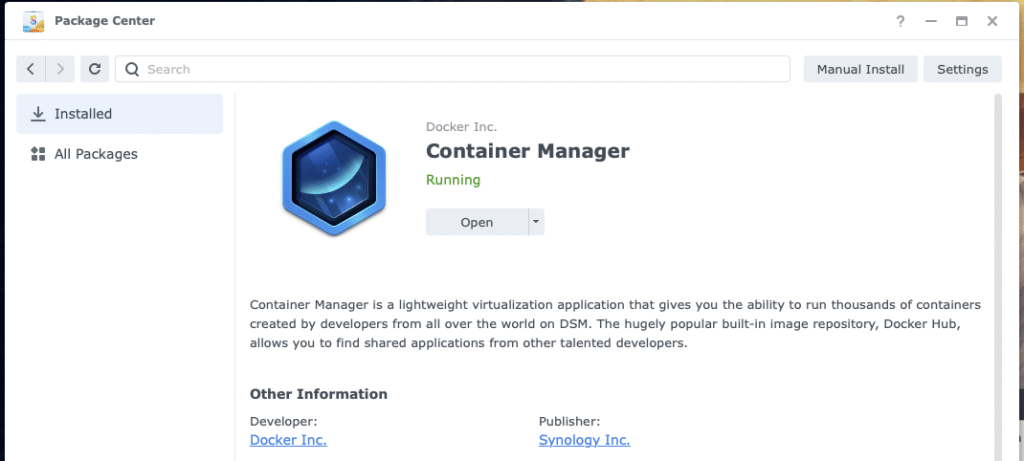
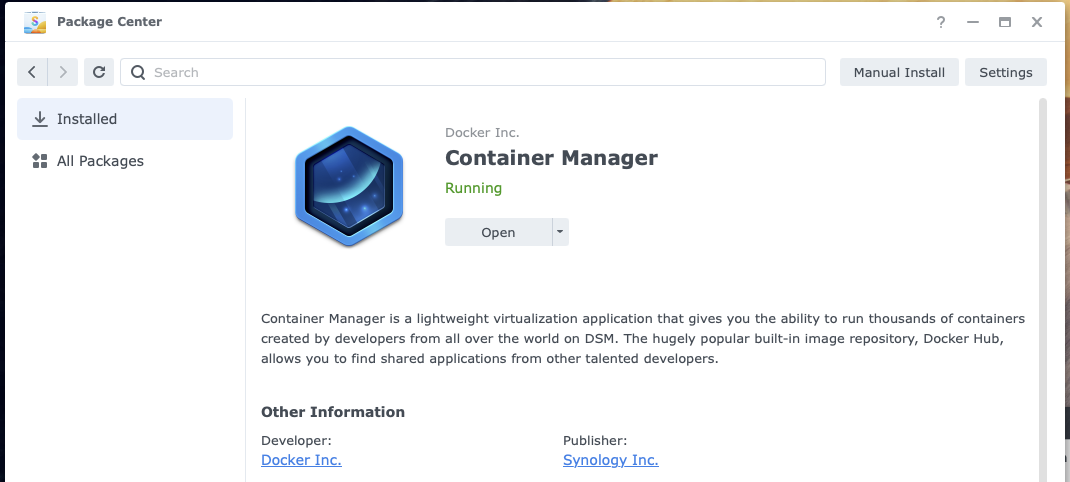
- Install the Container Manager on your Synology NAS. Developed by Docker and published by Synology.
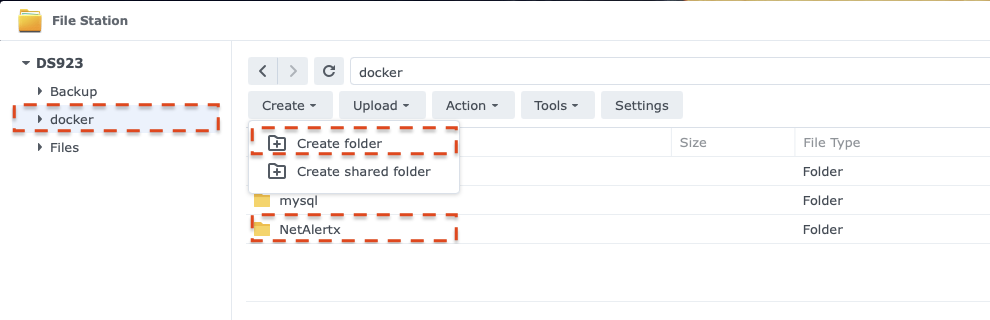
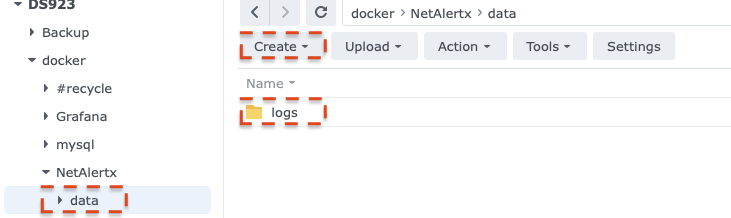
- Create a shared Docker folder for storing your Docker containers.
- Inside the Docker folder, create a new folder and name it NetAlertx.
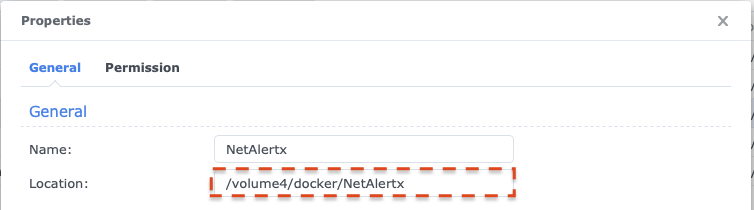
- Find the absolute path of the folder created in step 3 by viewing the properties of the folder.
- In the NetAlertx folder, created in step 3, create a new folder named data. (make the folder name lowercase)
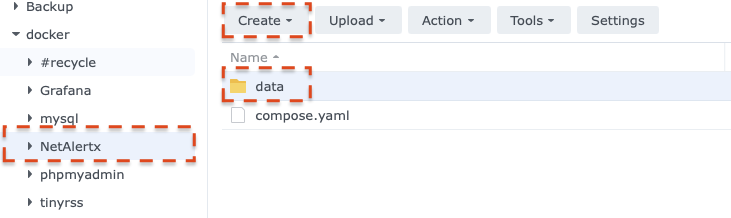
- In the data folder create a new folder named logs. (make the folder name lowercase)
- In Container Manager, create a new project and name it netalertx. Set the path to the NetAlertx folder created in step 3, and select Create docker-compose.yaml as the source.
- Enter the following configuration information into the source box. Replace the volume paths with the path from step 4. The sample configuration shows /volume4/docker/NetAlertx/ as an example; replace this with your path.
services:
  netalertx:
    container_name: netalertx
    image: "jokobsk/netalertx:latest"
    network_mode: host
    restart: unless-stopped
    cap_drop:
      - ALL
    cap_add:
      - NET_ADMIN
      - NET_RAW
      - NET_BIND_SERVICE
    volumes:
      - /volume4/docker/NetAlertx/data/logs:/tmp/log
      - /volume4/docker/NetAlertx/data:/data:rw
      - /etc/localtime:/etc/localtime:ro
    tmpfs:
      - "/tmp:uid=20211,gid=20211,mode=1700,rw,noexec,nosuid,nodev,async,noatime,nodiratime"
    environment:
      - PORT=20211

# https://github.com/jokob-sk/NetAlertX/blob/main/docker-compose.yml - Click Next
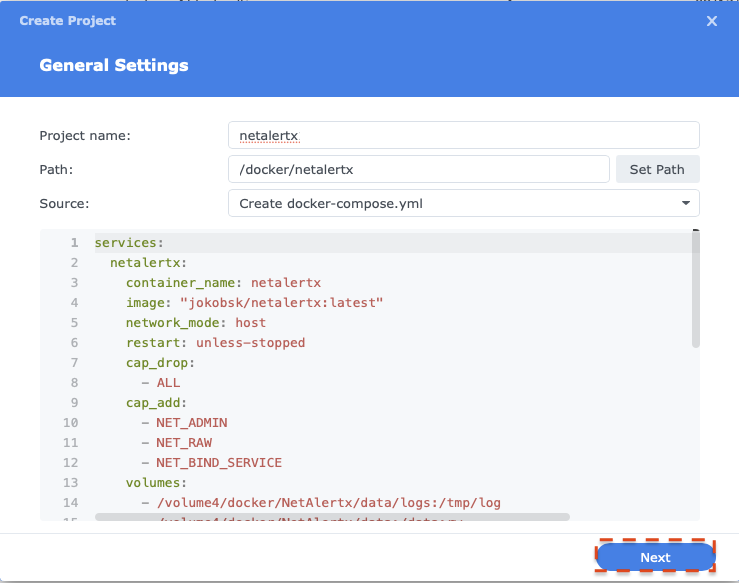
- Click Next
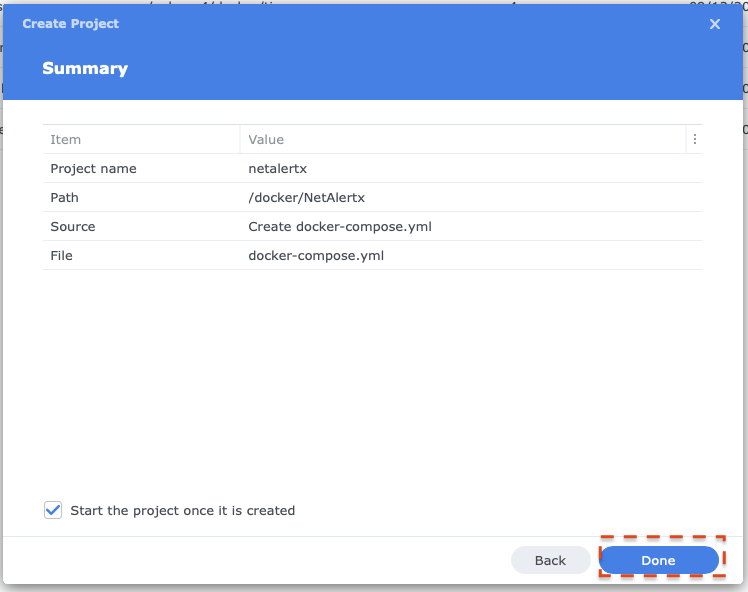
- Click Done to start the installation.
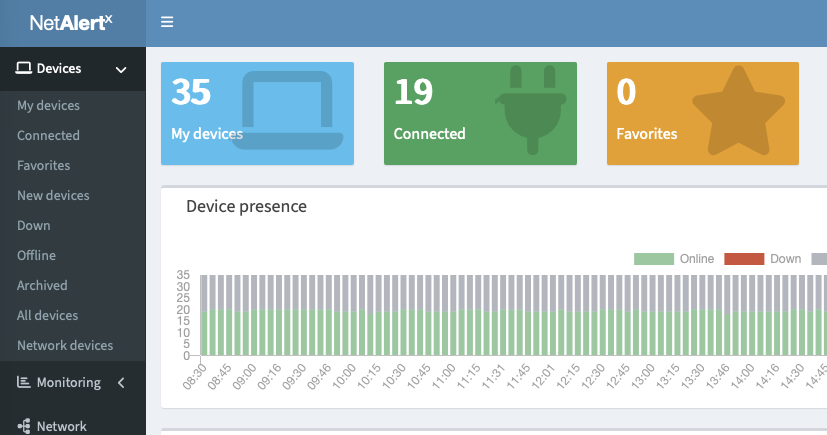
- Once installation is complete, access your NetAlertx installation through the host address of your Synology NAS, port 20211 (specified in the compose YAML).
7 comments
Skip to comment form
hey there,
sadly it dont work for me…. the container will be crashing and restarting all time:
2025/12/14 18:08:25 stderr ⚠️ ATTENTION: Configuration issues detected (marked with ❌).
2025/12/14 18:08:25 stderr [1;33m══════════════════════════════════════════════════════════════════════════════
2025/12/14 18:08:25 stderr
2025/12/14 18:08:25 stderr
2025/12/14 18:08:25 stdout /tmp/nginx/active-config | ✅ | ✅ | ✅ | ✅ | ✅
2025/12/14 18:08:25 stdout /tmp/run | ✅ | ✅ | ✅ | ✅ | ✅
2025/12/14 18:08:25 stdout /tmp/log | ❌ | ✅ | ❌ | ❌ | ✅
2025/12/14 18:08:25 stdout /tmp/api | ✅ | ✅ | ✅ | ✅ | ✅
2025/12/14 18:08:25 stdout /tmp/run/tmp | ✅ | ✅ | ✅ | ✅ | ✅
2025/12/14 18:08:25 stdout /data/config | ❌ | ✅ | ➖ | ➖ | ✅
2025/12/14 18:08:25 stdout /data/db | ❌ | ✅ | ➖ | ➖ | ✅
2025/12/14 18:08:25 stdout /data | ❌ | ✅ | ➖ | ➖ | ✅
2025/12/14 18:08:25 stdout ————————–+———–+——-+———+————-+———-
2025/12/14 18:08:25 stdout Path | Writeable | Mount | RAMDisk | Performance | DataLoss
Author
What do you have for permissions for the NetAlertX folder? Try adjusting the permissions on the NetAlertX folder for Everyone to read.
Read has not helped i set it now to Read / Write for Everyone now he has created a Config-folder and file but is still failing and is still not happy about the log-folder:
2025/12/17 12:00:46 stderr ❌ NetAlertX startup aborted: critical failure in first run db.sh.
2025/12/17 12:00:46 stderr [0m\033[1;31m══════════════════════════════════════════════════════════════════════════════
2025/12/17 12:00:46 stderr ══════════════════════════════════════════════════════════════════════════════
2025/12/17 12:00:46 stderr has write access to the database path and adequate storage space.
2025/12/17 12:00:46 stderr Check the logs for detailed SQLite error messages. Ensure the container
2025/12/17 12:00:46 stderr
2025/12/17 12:00:46 stderr * File system issues preventing database file creation
2025/12/17 12:00:46 stderr * Corrupted or inaccessible SQLite installation
2025/12/17 12:00:46 stderr * Insufficient disk space or write permissions in the database directory
2025/12/17 12:00:46 stderr
2025/12/17 12:00:46 stderr failure typically indicates:
2025/12/17 12:00:46 stderr NetAlertX cannot start without a properly initialized database. This
2025/12/17 12:00:46 stderr
2025/12/17 12:00:46 stderr ❌ CRITICAL: Database schema creation failed for /data/db/app.db.
2025/12/17 12:00:46 stderr [1;31m══════════════════════════════════════════════════════════════════════════════
2025/12/17 12:00:46 stderr [0mError: unable to open database “/data/db/app.db”: unable to open database file
2025/12/17 12:00:46 stderr ══════════════════════════════════════════════════════════════════════════════
2025/12/17 12:00:46 stderr database before onboarding sensitive networks.
2025/12/17 12:00:46 stderr Do not interrupt this step. Once complete, consider backing up the fresh
2025/12/17 12:00:46 stderr
2025/12/17 12:00:46 stderr 🆕 First run detected. Building initial database schema in /data/db/app.db.
2025/12/17 12:00:46 stderr [1;36m══════════════════════════════════════════════════════════════════════════════
2025/12/17 12:00:46 stdout –> first run db.sh
2025/12/17 12:00:46 stdout –> first run config.sh
2025/12/17 12:00:46 stderr [0m
2025/12/17 12:00:46 stderr ══════════════════════════════════════════════════════════════════════════════
2025/12/17 12:00:46 stderr https://github.com/jokob-sk/NetAlertX/blob/main/docs/docker-troubleshooting/mount-configuration-issues.md
2025/12/17 12:00:46 stderr https://github.com/jokob-sk/NetAlertX/blob/main/docs/DOCKER_COMPOSE.md
2025/12/17 12:00:46 stderr Review the documentation for a correct setup:
2025/12/17 12:00:46 stderr
2025/12/17 12:00:46 stderr configuration can be quite complex.
2025/12/17 12:00:46 stderr We recommend starting with the default docker-compose.yml as the
2025/12/17 12:00:46 stderr
2025/12/17 12:00:46 stderr as shown in the table above.
2025/12/17 12:00:46 stderr Your configuration has write permission, dataloss, or performance issues
2025/12/17 12:00:46 stderr
2025/12/17 12:00:46 stderr ⚠️ ATTENTION: Configuration issues detected (marked with ❌).
2025/12/17 12:00:46 stderr [1;33m══════════════════════════════════════════════════════════════════════════════
2025/12/17 12:00:46 stderr
2025/12/17 12:00:46 stderr
2025/12/17 12:00:46 stdout /tmp/nginx/active-config | ✅ | ✅ | ✅ | ✅ | ✅
2025/12/17 12:00:46 stdout /tmp/run | ✅ | ✅ | ✅ | ✅ | ✅
2025/12/17 12:00:46 stdout /tmp/log | ✅ | ✅ | ❌ | ❌ | ✅
2025/12/17 12:00:46 stdout /tmp/api | ✅ | ✅ | ✅ | ✅ | ✅
2025/12/17 12:00:46 stdout /tmp/run/tmp | ✅ | ✅ | ✅ | ✅ | ✅
2025/12/17 12:00:46 stdout /data/config | ✅ | ✅ | ➖ | ➖ | ✅
2025/12/17 12:00:46 stdout /data/db | ✅ | ✅ | ➖ | ➖ | ✅
2025/12/17 12:00:46 stdout /data | ✅ | ✅ | ➖ | ➖ | ✅
2025/12/17 12:00:46 stdout ————————–+———–+——-+———+————-+———-
2025/12/17 12:00:46 stdout Path | Writeable | Mount | RAMDisk | Performance | DataLoss
Author
Did you map the logs file? Review the options on https://github.com/jokob-sk/NetAlertX/blob/main/docker-compose.yml
Hi,
Thanks for the reply to Milcho which resolved part of my issue, I’m now stuck with
2025/12/15 10:54:32 stdout /tmp/nginx/active-config | ✅ | ✅ | ✅ | ✅ | ✅
2025/12/15 10:54:32 stdout /tmp/run | ✅ | ✅ | ✅ | ✅ | ✅
2025/12/15 10:54:32 stdout /tmp/log | ✅ | ✅ | ❌ | ❌ | ✅
2025/12/15 10:54:32 stdout /tmp/api | ✅ | ✅ | ✅ | ✅ | ✅
2025/12/15 10:54:32 stdout /tmp/run/tmp | ✅ | ✅ | ✅ | ✅ | ✅
2025/12/15 10:54:32 stdout /data/config | ✅ | ✅ | ➖ | ➖ | ✅
2025/12/15 10:54:32 stdout /data/db | ✅ | ✅ | ➖ | ➖ | ✅
2025/12/15 10:54:32 stdout /data | ✅ | ✅ | ➖ | ➖ | ✅
2025/12/15 10:54:32 stdout ————————–+———–+——-+———+————-+———-
2025/12/15 10:54:32 stdout Path | Writeable | Mount | RAMDisk | Performance | DataLoss
Is my DS223 not performant enough or are there other options to tweak?
kind regards
Patrick
Author
Are you mapping the /tmp/log file to a folder on your NAS? Is the folder accessible and does it have permissions? You can assign permissions to the user id 20211 or everyone (to test). If you do not want the log files to persist, you can remove that from the volume mapping.
The same permission error for me also, anything i miss?
i have set the /netalertx folder to everyone have read/write permission alreday.
2026/01/22 16:20:58 stderr configuration can be quite complex.
2026/01/22 16:20:58 stderr We recommend starting with the default docker-compose.yml as the
2026/01/22 16:20:58 stderr
2026/01/22 16:20:58 stderr * /tmp/nginx/active-config error writing
2026/01/22 16:20:58 stderr * /tmp/run error writing
2026/01/22 16:20:58 stderr * /tmp/log error writing, performance issue
2026/01/22 16:20:58 stderr * /tmp/api error writing
2026/01/22 16:20:58 stderr * /tmp/run/tmp error writing
2026/01/22 16:20:58 stderr * /data/config error writing
2026/01/22 16:20:58 stderr * /data/db error writing
2026/01/22 16:20:58 stderr * /data error writing
2026/01/22 16:20:58 stderr
2026/01/22 16:20:58 stderr ⚠️ ATTENTION: Configuration issues detected (marked with ❌).
2026/01/22 16:20:58 stderr [1;33m══════════════════════════════════════════════════════════════════════════════
2026/01/22 16:20:58 stderr
2026/01/22 16:20:58 stderr
2026/01/22 16:20:58 stderr /tmp/nginx/active-config | ✅| ❌| ✅ | ✅ | ✅ | ✅
2026/01/22 16:20:58 stderr /tmp/run | ✅| ❌| ✅ | ✅ | ✅ | ✅
2026/01/22 16:20:58 stderr /tmp/log | ✅| ❌| ✅ | ❌ | ❌ | ✅
2026/01/22 16:20:58 stderr /tmp/api | ✅| ❌| ✅ | ✅ | ✅ | ✅
2026/01/22 16:20:58 stderr /tmp/run/tmp | ✅| ❌| ✅ | ✅ | ✅ | ✅
2026/01/22 16:20:58 stderr /data/config | ✅| ❌| ✅ | ➖ | ➖ | ✅
2026/01/22 16:20:58 stderr /data/db | ✅| ❌| ✅ | ➖ | ➖ | ✅
2026/01/22 16:20:58 stderr /data | ✅| ❌| ✅ | ➖ | ➖ | ✅
2026/01/22 16:20:58 stderr ————————–+—+—+——-+———+————-+———-
2026/01/22 16:20:58 stderr Path | R | W | Mount | RAMDisk | Performance | DataLoss
2026/01/22 16:20:57 stdout –> mounts.py
2026/01/22 16:20:57 stdout [90mSee https://docs.netalertx.com/docker-troubleshooting/missing-capabilities%5B0m
2026/01/22 16:20:57 stdout [90mSecurity context: Operational capabilities (CHOWN SETGID SETUID) not granted.[0m
2026/01/22 16:20:57 stdout –> capabilities audit.sh
2026/01/22 16:20:57 stdout –> data migration.sh
2026/01/22 16:20:57 stdout Startup pre-checks