
Install from the Marketplace — Source on GitHub
Two extensions in, I didn’t plan a third so soon. But Business Central’s exploring event model was something I’ve wanted to do for a while, and it turned out to be a bigger task than the first two VS Code extensions.
A quick recap for anyone who hasn’t written AL: Microsoft Dynamics 365 Business Central is extended through events. Microsoft’s base application — and many of the ISV and PTE apps layered on top of it — publish [IntegrationEvent] and [BusinessEvent] declarations, and code hooks into them with [EventSubscriber]. It’s a clean model right up until you need to answer a basic question: who is listening to this event? Or the other direction: the event I just subscribed to — does it still exist, and where?
VS Code gives you nothing here. The publisher you care about might be in your workspace, or it might be buried in a compiled .app file in .alpackages whose source you can’t even open. The honest answer most days is a grep, then another grep, then giving up and reading the BaseApp source on GitHub.
I wanted that answered inside the editor. So I came up with AL EventLens.
Install from the Marketplace — Source on GitHub
What it does
AL EventLens indexes the [IntegrationEvent], [BusinessEvent], and [EventSubscriber] declarations in your workspace and in the .app packages sitting in .alpackages, resolves which subscriber connects to which publisher, and surfaces the event publisher and subscribers.
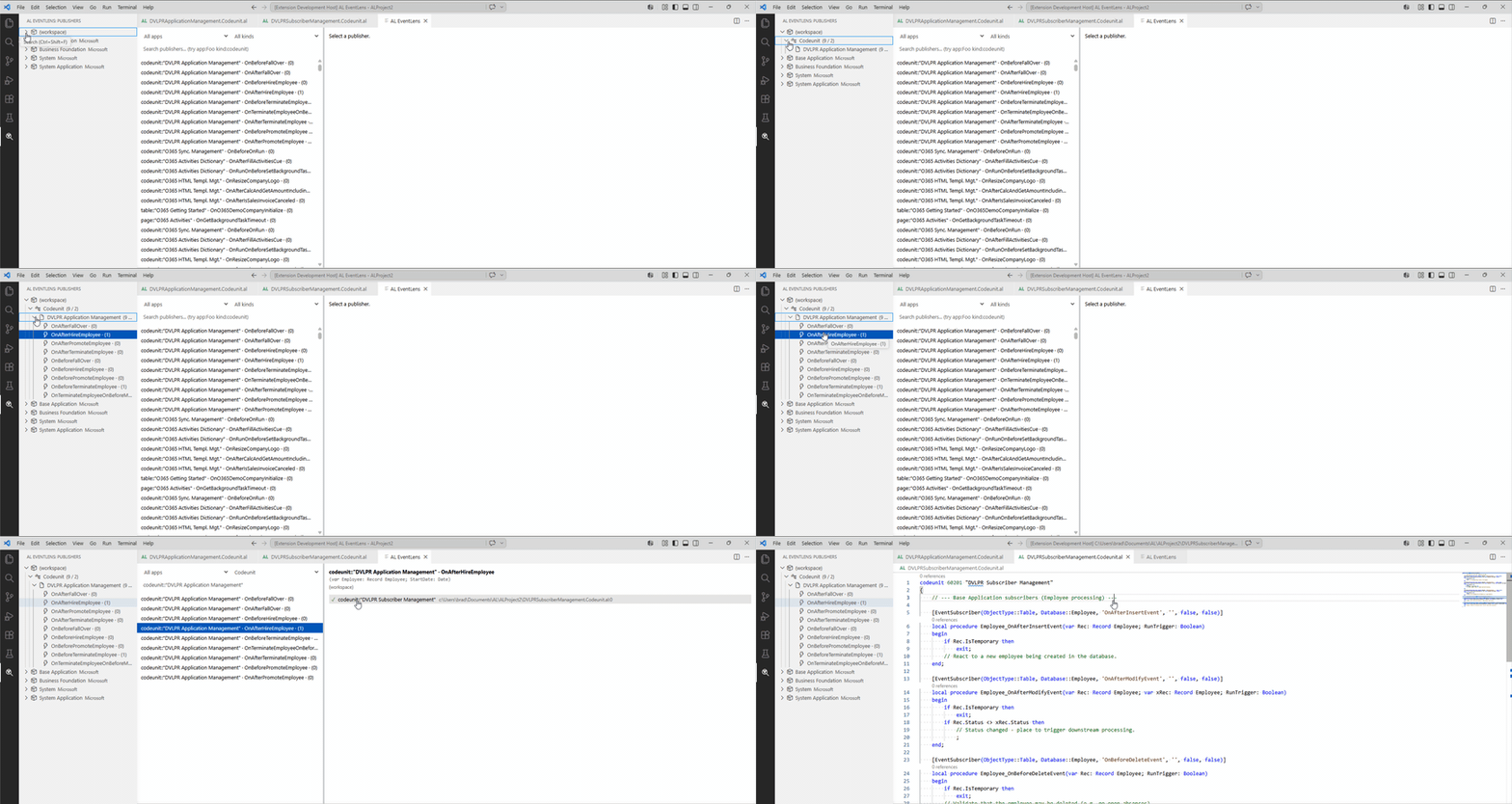
A searchable panel. A publisher list on the left, each row carrying a live subscriber count; a detail pane on the right listing the subscribers for the selected publisher with a resolved (✓) or unresolved (⚠) badge, file path, and line number. Click a subscriber to jump straight to its source. The App and Kind dropdowns filter the list, and the search box accepts app:, kind:, and object: prefixes for power-user narrowing.
An activity-bar view. A dedicated tree that drills four levels — source app → AL object kind → object → event — with (events / subscribers) counts on the intermediate rows so a busy subtree is obvious without expanding it. Dependency apps show their friendly name and vendor pulled from the package manifest.
Inline CodeLens. A live "N subscribers" lens sits above each [IntegrationEvent] and [BusinessEvent] declaration in the file you’re editing. Click it to open the panel scoped to that publisher.
The point of all this is the cross-app resolution. Each subscriber is matched against its target publisher and marked resolved or unresolved — and an unresolved subscriber almost always means the target app is simply missing from .alpackages, which is useful to know on its own. Resolved links are click-jumpable even when the publisher is contained within a compiled dependency.
Rounding it out: a Mermaid export command for dropping a subscriber graph into docs, incremental re-indexing on save so the index stays warm, a persistent cache keyed by (appId, version, mtime) so re-opening a workspace should load faster.
If you write AL and you’ve ever grepped four apps to find out who subscribes to one event, grab AL EventLens from the marketplace.
If you have any suggestions please let me know.