
Markdown Foundry 0.4.0 shipped today. Three new commands, four new settings, and a meaningful test gate for the first time since the test infrastructure was added (which is its own story — separate post).
The extension is at marketplace.visualstudio.com/items?itemName=dvlprlife.mdfoundry. Full release notes in CHANGELOG.md. For context, Markdown Foundry is a VS Code extension focused on table-centric editing — align, sort, navigate, convert CSV/TSV — plus formatting toggles for everyday Markdown authoring. 0.4.0 widens the authoring surface beyond tables for the first time.
What’s new
Insert Table. Pick a size from a quick-pick — preset 2×2 through 5×4, or Custom... for free-form dimensions — and get a pre-aligned empty Markdown table at the cursor. The first header cell is selected, so typing immediately overwrites it; the second cell is one Tab away. Until this release, the only way to create a table was to type CSV/TSV first and run Convert Selection to Table. That’s fine when you already have data, but it’s friction when you’re starting from “I need a quick comparison table.” The new command reuses the existing formatter, so the inserted output is already aligned — no follow-up Align Table needed. Header cells default to Column 1, Column 2, … which you’d normally rename, but selecting the first cell on insert makes the rename feel automatic rather than a separate step.
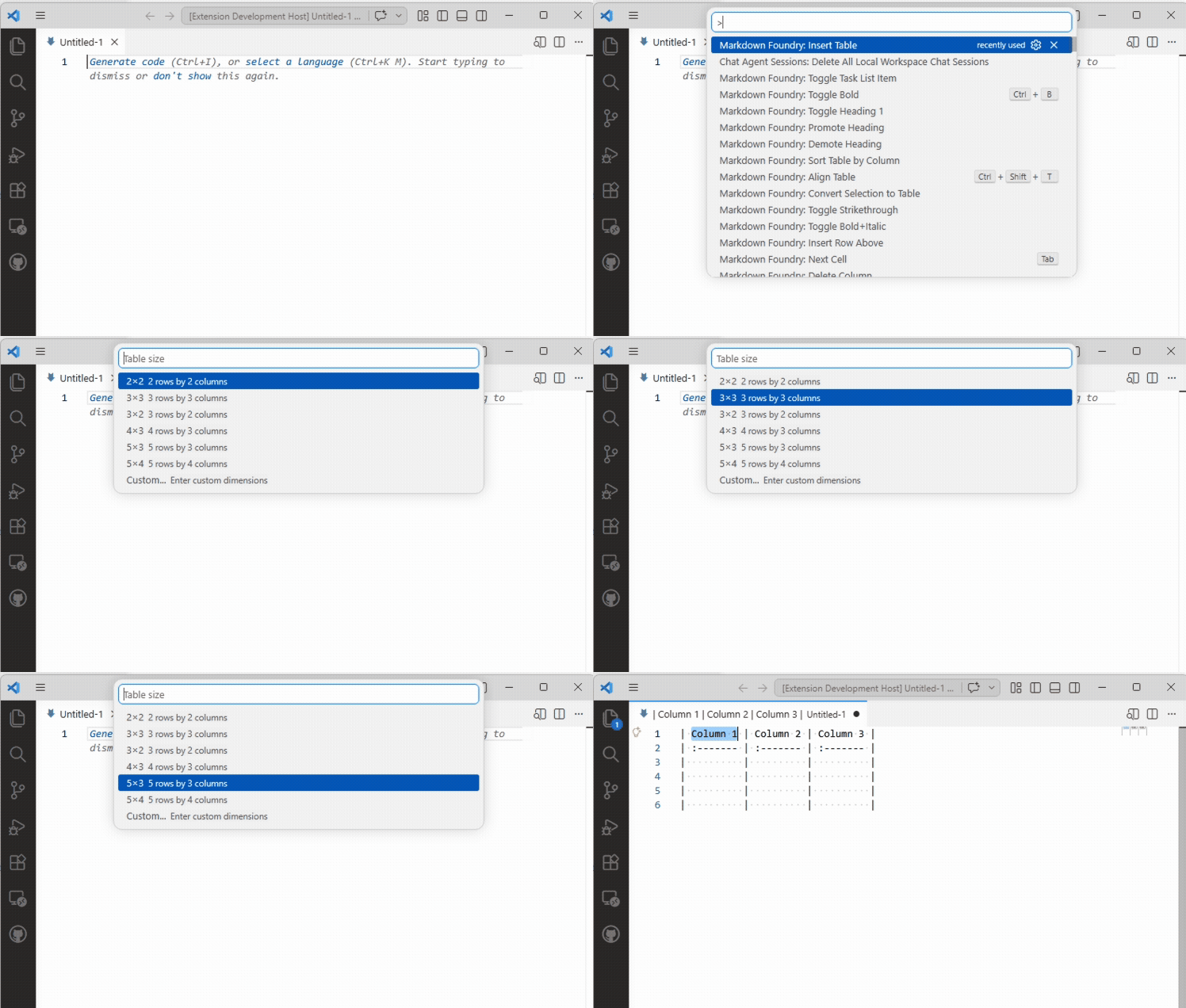
The grid sizes were chosen by sampling the tables I’d written in the previous month: most were 2- or 3-column, 3- to 5-row, with the occasional 4×3 or 5×4 for comparison matrices. The presets cover the common cases without forcing a custom dimension prompt for the 80% case.
Toggle Bullet List / Toggle Numbered List. Line-oriented toggles that turn plain lines into - bullet or 1./2./3. numbered items, and re-invoke to strip the prefix. Indentation is preserved so nested lists round-trip cleanly. The bullet toggle accepts -, *, or + on the way out — whichever character your existing list uses — but always emits - on the way in for consistency. The numbered toggle increments globally across the selection: indented sub-items still advance the count rather than restarting at 1, which matches how every Markdown renderer I’ve seen handles a list of mixed-depth items. Both palette-only because Ctrl+L and Ctrl+Shift+L are claimed by VS Code’s selection commands, and overriding stock keybindings on a frequently-used chord seems hostile.
This closes a gap from the formatting toggles that shipped in 0.2.0 and 0.3.0 — those covered emphasis (bold/italic/strikethrough), code blocks, blockquote, headings, task lists, and horizontal rule, but skipped plain bullet and numbered lists. The task list (- [ ] item) was already in, but the unchecked bullet case had to be done by hand.
Insert/Update Table of Contents. Scans the document, generates a nested Markdown list of links, wraps it in <!-- markdownfoundry-toc --> markers. If those markers already exist when you re-invoke the command, it replaces only the content between them — no duplicate TOCs, no loss of surrounding text. Headings inside fenced code blocks (``` and ~~~) and HTML comments are skipped, so example Markdown inside your prose doesn’t pollute the index. Slugs are GitHub-compatible: lowercase, whitespace-to-hyphen, drop punctuation outside [a-z0-9_-]. Duplicate headings get -1/-2/… suffixes in document order, again matching GitHub’s rendering.
Four new settings come with it: markdownFoundry.toc.minDepth (default 2 — skip the H1 since most docs have a single title), maxDepth (default 6), indent (default 2 spaces per depth level), and includeMarkers (default true; turn it off if you want one-shot insertion with no in-place update).
Getting it
ext install dvlprlife.mdfoundry from the command palette, or the marketplace listing. If it’s already installed, VS Code will pick up 0.4.0 on the next auto-update. Issues and feature requests at github.com/dvlprlife/Markdown-Foundry.