
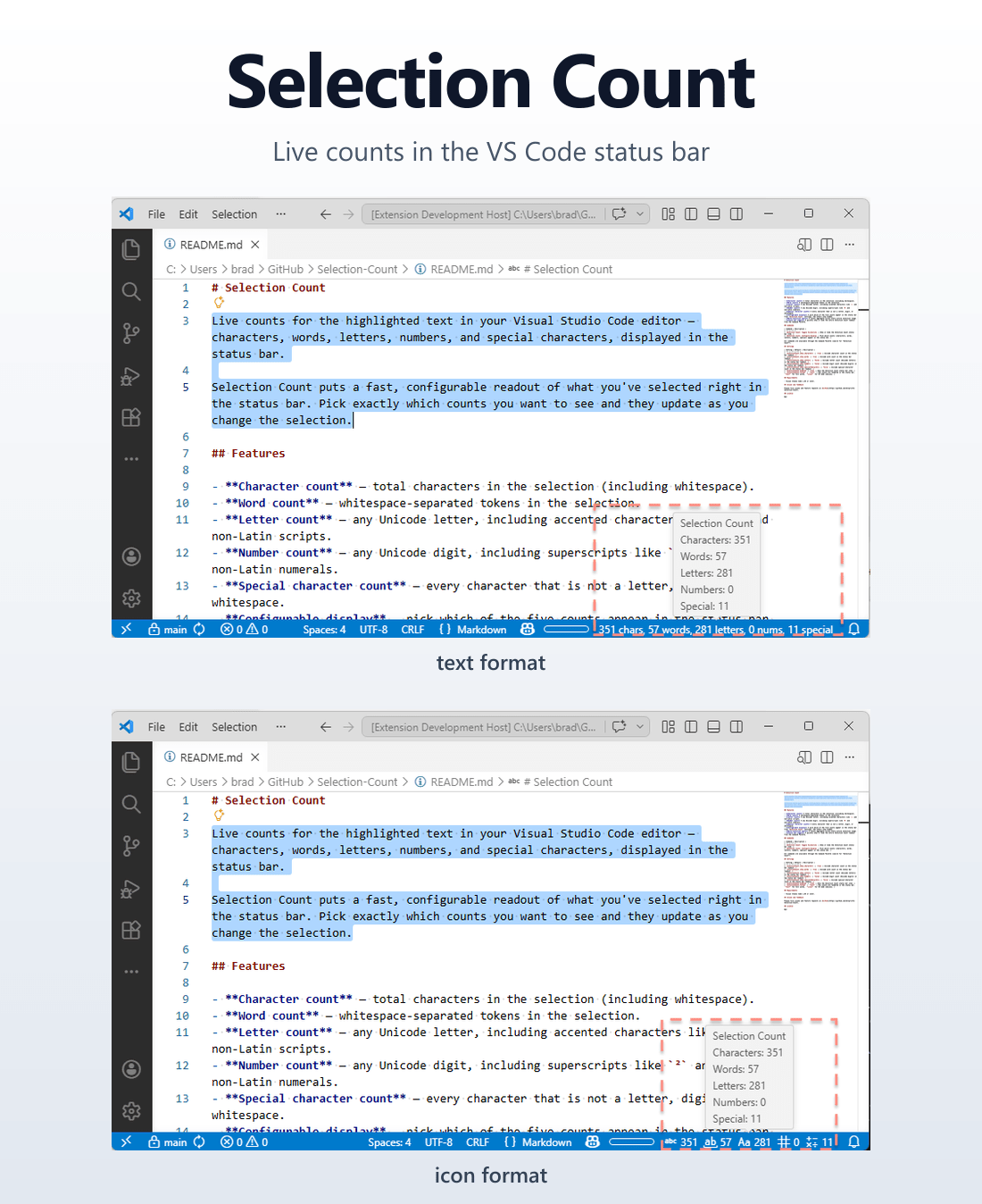
After Markdown Foundry shipped, I had no plans to immediately go again. Then I noticed the same blind spot every time I selected text in VS Code: the bottom-right corner shows the cursor position and the length of the selection, but nothing about what’s actually in it. How many words is this paragraph? How many digits in this CSV column? How many non-letter, non-digit characters in this filename? VS Code shows (351 selected) and stops there.
I wanted more. Specifically, five categories — characters, words, letters, numbers, and special characters — visible in the status bar, toggleable per-category, in either plain text or codicons.
So I vibe-coded a second extension: Selection Count.
Install from the Marketplace — Source on GitHub
What it does
The status bar shows live counts for whatever you have selected. By default it shows characters and words; via the Selection Count: Configure Display command you can toggle on letters, digit-counts, and special characters. Multi-cursor selections aggregate across every range. Empty selection hides the indicator entirely — the whole feature is selection count.
The format setting flips between plain text — 351 chars, 57 words, 281 letters, 0 nums, 11 special — and codicons, where the labels are replaced with VS Code’s built-in glyphs (symbol-string, whole-word, case-sensitive, symbol-number, symbol-operator). Either way, hovering the indicator shows a long-form breakdown.
The counters are Unicode-aware: é counts as a letter, ² counts as a number. That last detail tripped me up — see below.
How round two went
Same agentic workflow as Markdown Foundry: an agents/ directory, a CLAUDE.md rulebook, and the issue → planner → worker → reviewer cycle. The big difference this time was muscle memory. I knew where the friction was, what to write down up front, and which conventions to put in CLAUDE.md so the agents wouldn’t re-litigate them every PR. Three things stood out.
Drafting the issue body really matters. For each piece of work, I wrote a complete acceptance-criteria checklist before letting the agent loop touch it. That up-front investment removed almost all of the “wait, what did you mean by X” questions during implementation. The plan-driven cadence is the unlock — without a tight plan, agents wander.
The reviewer caught a real bug. The counter spec called for \p{L} and \p{N} (Unicode letter / number categories), but the README still described them as ASCII-only — A–Z and 0–9. The drift was flagged during a README review pass and we shipped a fix before publish. That’s exactly the failure mode a written rulebook plus a reviewer pass is supposed to catch.
Scope narrowing is fine. The original plan for the README demo section called for four GIFs. By the time we got there, three screenshots and one GIF told the story well enough, so we shipped that and tracked the rest as follow-ups. Not every ideal plan survives the reality of polishing a weekend extension. Cutting scope to ship beats polishing in private.
What’s next
A few obvious follow-ups are tracked but deferred:
- Default keybindings for the Toggle Visibility and Configure Display commands.
- Debouncing the status bar update for very large selections (a 100k-line select-drag currently runs five regexes per move tick).
- A multi-cursor demo GIF, since the static screenshots don’t show aggregation.
None of these are urgent. The extension does its job at v0.1.0; sharper UX can land in 0.1.x as feedback comes in.
If you live in selections and want a tighter readout than VS Code’s built-in (N selected), grab it from the marketplace. And if you’ve been on the fence about agentic development workflows: writing the rules down once and letting the agents follow them really is the unlock.